
Support/Resources/How do I coach the AI while editing a writeup?
How do I coach the AI while editing a writeup?
Jul 7, 2026
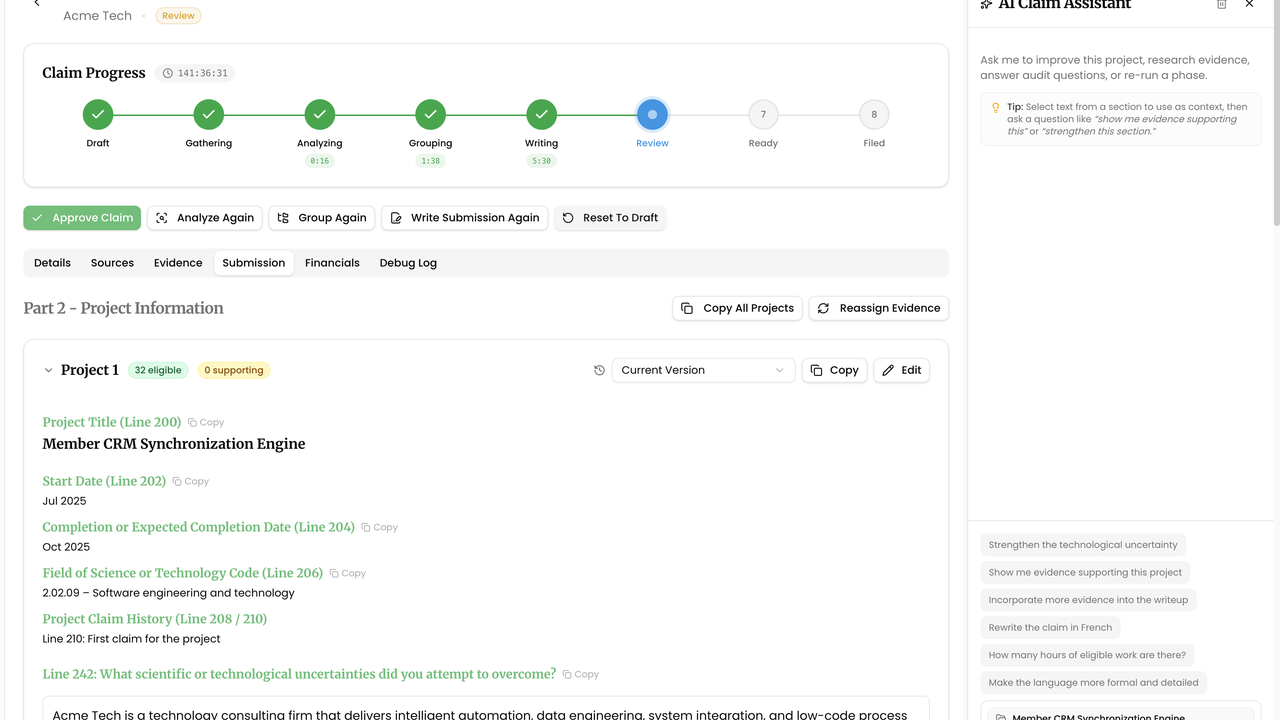
Line-by-line edits are sometimes enough; often you want faster rewrites that still sound like your agency. The AI Claim Assistant sits beside the Submission so you can coach changes in context—and you remain the reviewer who accepts or rejects them.
How to use
- Open the claim → Submission and expand the project you are editing.
- Click Open AI claim assistant to show the AI Claim Assistant panel.
- Select the passage you want improved (uncertainty, work performed, or advancement text) so the assistant has selection context.
- Ask a concrete request, or use a suggested prompt such as strengthening technological uncertainty or tightening CRA language. Prefer specific instructions (“shorten Line 244 by 80 words and keep the experiment sequence”) over vague “make this better.”
- Review the proposal against evidence and word limits. Apply only what you would defend; rephrase manually when the model drifts.
- Repeat for other projects. Close the assistant when you are done, then Copy text for filing when ready.
Related
Next article
I regenerated by mistake — how do I get my draft back?