
Support/Releases/AI Employee Name Merging for Timesheet Consolidation
AI Employee Name Merging for Timesheet Consolidation
Jun 11, 2026
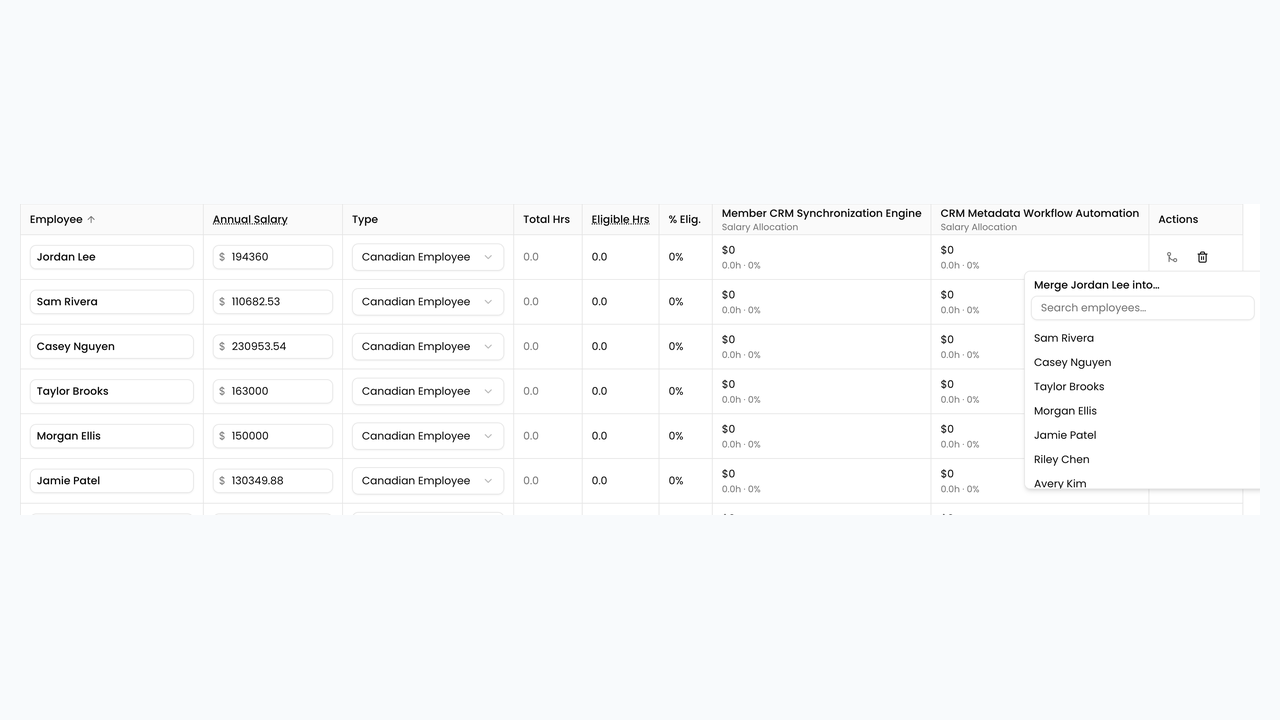
An AI process now identifies when timesheet entries from different sources refer to the same employee under different name formats and consolidates their hours under one canonical identity, with a manual merge/split option available in the Financials tab. This prevents under- or over-counting of an employee's hours when their name appears inconsistently across connected systems, which directly affects the accuracy of the financial claim.
How to use
- Open the claim’s Financials tab after writeup/financial preparation has run.
- Review the employee list for duplicate people under different name formats.
- Click Employee merge actions on a row and choose the person to merge into.
- Confirm the merge so hours and salary rows consolidate under one canonical name.
- Use split/unmerge actions if a merge was incorrect.
- Re-check eligibility hours and project allocations after merging.
Next article
Confluence and Bitbucket Evidence Source Connectors